


Guessing when your money lands is a bad way to set an ad budget.
You could already see your JVZooPay balance. What wasn’t always clear was how much of it was on hold, how much was sitting in reserve, when it would be released, and what you could expect next.
So you pieced it together from balances and transaction reports. Then you made a call on ad spend and hoped the numbers held up.
We’ve upgraded JVZooPay so you don’t have to guess.
What you actually get
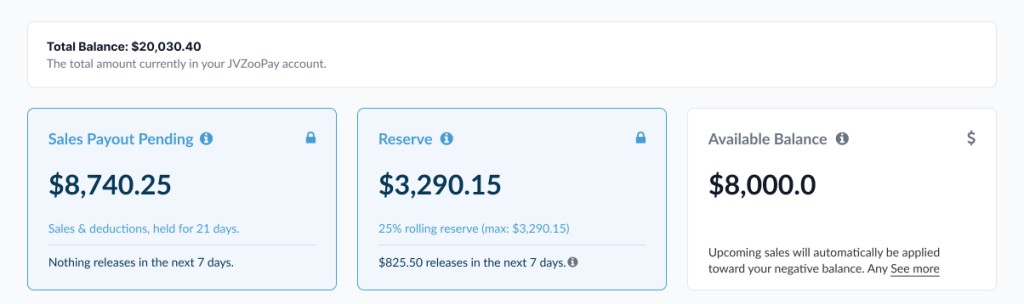
Your balance, broken down. Instead of one combined number, JVZooPay now separates your Total Balance, Sales Payout Pending, Reserve and Available Balance. You can see what’s held from sales, what’s in reserve and what’s actually available to you.
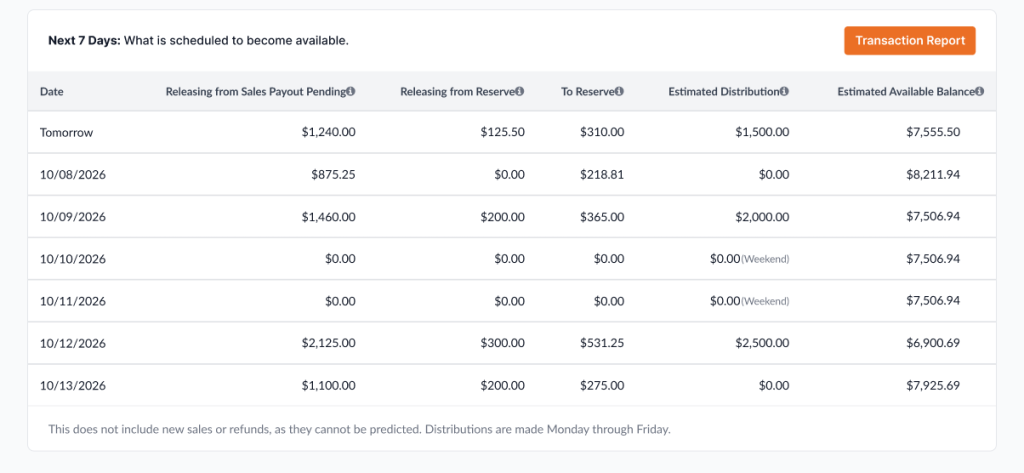
A 7-day preview of what’s coming. The Next 7 Days section shows what’s expected to become available each day. For every day, you see funds releasing from Sales Payout Pending, funds releasing from Reserve, funds moving into Reserve, estimated distributions and your estimated Available Balance.
Your rolling reserve, out in the open. See what’s sitting in your rolling reserve and which reserve releases are coming up.
A 7-day look back. The Last 7 Days section shows how money moved through your account: where it came in and where it went.
Help on the page. Tooltips across the JVZooPay page explain balances, holds, reserves and distribution activity.
Detail when you need it. The improved Transaction Report and filtering make it easier to dig into individual transactions and the activity behind your balances.
How to check it out
- Log in to JVZoo and open JVZooPay.
- Start with your four balance cards: Total Balance, Sales Payout Pending, Reserve and Available Balance.
- Check Next 7 Days to see what’s expected to become available each day.
- Check Last 7 Days to see where your money came in and where it went.
- Open the Transaction Report when you want to look at individual transactions.

Tip: check Next 7 Days before you set ad spend
Before you decide how much to put back into ads, a campaign or your next launch, look at Next 7 Days.
It shows your estimated distributions and estimated Available Balance for each day.
It’s an estimate. It still beats a hunch.
What this actually changes
The questions that used to send you digging through transaction reports now have a place to look:
- How much money is currently being held?
- How much is sitting in reserve?
- When will money be released from hold or reserve?
- How much am I expected to receive next?
- Why did my available balance change?
Your balance, holds, reserves, distributions and recent activity now sit together, so you get a much clearer view of where you stand.
And when your Available Balance moves, you can see why. The daily breakdown shows money moving into and out of Sales Payout Pending and Reserve.
Where to find it
Log in to JVZoo and open JVZooPay. Start with Next 7 Days.
Full walkthrough: Understanding Your JVZooPay Dashboard
Questions? Our support team is at JVZoosupport.com.
The JVZoo Team
